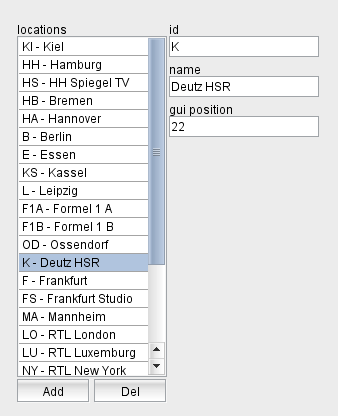
The section in the top left corner of the window shows the list of locations. Locations typically match rooms or cities, but strictly spoken 'locations' in the sense of this software are logically places which share a number of encoder/decoder devices which are connected in a network with virtually infinite bandwidth (i.e. the bandwidth of the network between the local devices is not managed by the software).
A location has a number of outgoing data lines and a number of TX and/or RX devices attached.
The 'locations' section shows the list of defined locations, selecting a location in the list shows the properties of this location right beside the list. Selecting a location also updates the data in the Outgoing Lines , TX Device and RX Devices sections to show these objects as they are available at the selected location.
You may edit the properties of the selected location to your needs. The location is uniquely identified by its ID, this cannot be changed once a location has been defined.
The button "Add" lets you add a new location. The program shows a dialog window where you can enter the ID for the new location. An ID entirely consists of upper case letters and digits, the "-" character is allowed as a separator. The ID must be unique, you cannot define two locations with the same ID. The ID also is unalterable, once you defined a new location you cannot change the ID of the location later.
The button "Del" lets you delete the selected location. The program shows a query dialog before the location actually gets deleted. Deleting a location does not delete any sat-nms device definitions associated with this location.