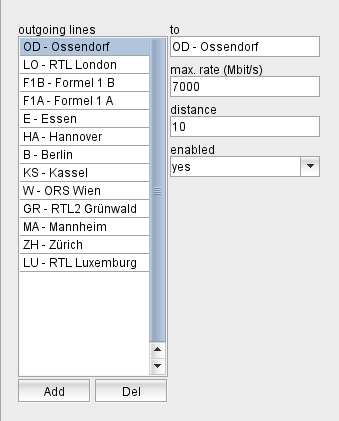
The section "outgoing lines" below the "locations" section defines the data lines which go from the selected location to other locations. The software manages data lines as unidirectional connections from location A to B. To define bidirectional lines, you have to define the line twice: once as a line from A to B and a second time as a line from B to A.
The section "outgoing lines" shows the list of data lines starting at the actually selected location. Selecting a line in the list shows the properties of this line right beside the list.You may edit the properties of the selected data line to your needs
The button "Add" lets you add a new line. The program shows a dialog window where you can select the destination location for the line.
The button "Del" lets you delete the selected line. The program shows a query dialog before the line actually gets deleted.
Route Calculation
In the VioIP system the route from one location to another is determined by the settings of the IP routers in the system and by source/destination IP addresses. To calculate the available bandwidth between two locations, the software must know the way the IP packets take, specially when the route goes over several hops. The available bandwidth then is calulated as the minimum bandwidth available on any line on this route.
The software uses for this the "shortest path" algorithm by Dijkstra: Each line has assigned a "distance" value, the total distance of a route is the sum of distances of all hops of the route. From all possible routes the software chooses the one with the shortest total distance.
As the software cannot read the settings of the routers used in the network, it is important to set the "distance" parameters in a way that the routes calculated by the VioIP software match the routing programmed in the IP routers. You may check the routes actually used in the software in the VioIP Client Application : Select a source location in the TX button array and then right-click the destination in the RX button array and select "Show route to here". The program displays a pop up window with the route.