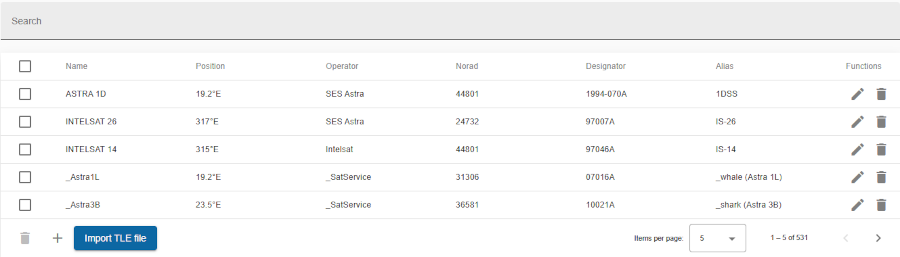
This shows the list of all satellites in the database.
Satellites are stored by there unique name. We recommend to use the names used by CelesTrak, because this allowes easy bulk import of TLE (two-Line elements). If you prefere deferent name, use the optional Alias field.
The satellite list itself does not contain any satellite position because they depends on the individual antenna. These positions can be found on the Antenna list page.
To use this satellites to move antennas you have to configure the corresponding Antenna Management Devices on the MNC server(s) which controlls the ACU (antenna control unit):
Search bars
Header row
Table columns
The first column located at the far left of the table provides a checkbox to select one or more channels (rows) and perform the same operation on all selected channels.
The following function(s) are available:
| Function | Icon | Description |
|---|---|---|
| delete |  |
delete the selected satellite from the database |
The last column located at the far right of the tables provides buttons to run actions on the corresponding satellite.
The following functions for managing a satellite are available:
| Function | Icon | Description |
|---|---|---|
| Delete | |
to delete the satellite |
| Edit |  |
modify/edit satellite |
The following buttons for global function(s) are available at the the bottom of the table:
| Function | Icon | Description |
|---|---|---|
| Add |  |
add a new satellite |
| Delete | |
to delete all selected the satellite |
| Import | Import TLE file | [import TLE] data from file |
| Page | Pagination controls | set the number of items displayed per page (e.g., 5, 10, or 25) and navigate between pages |
The satellite table contains the following columns:
| Column name | Description |
|---|---|
| Name | name of satellite |
| Position | satellite orbit position in degrees |
| Operator | name of satellite operator |
| Norad number | NORAD Catalog Number |
| Designator | International Designator |
| Alias | Customized alias name |
Clicking on a satellite row shows other relatives tables:
Bottom toolbar