 origin: OMRON user
Documentation 3G3M1-STD User manual I669-E1-02.pdf
origin: OMRON user
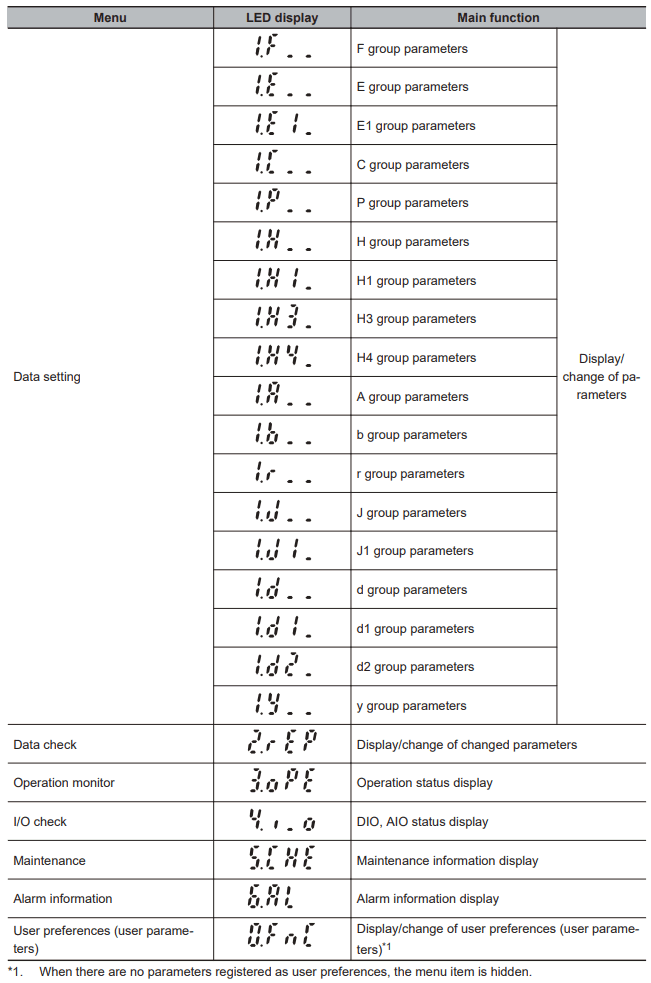
Documentation 3G3M1-STD User manual I669-E1-02.pdfThe Program mode has functions, for example, for setting and checking parameters, and for monitoring maintenance-related information and input/output (I/O) terminal information. The digit (number) on the left end displayed on the Digital Operator LED indicates the menu No., and the remaining three digits indicate menu content. From the second time onwards that the Program mode is entered, the menu that was active when the Program mode was previously exited is displayed.
origin: OMRON user
Documentation 3G3M1-STD User manual I669-E1-02.pdf
Some main Menu points are described below. For Menu points not described in this documentation or ore detailed information, please refer to the frequency inverter’s documentation.
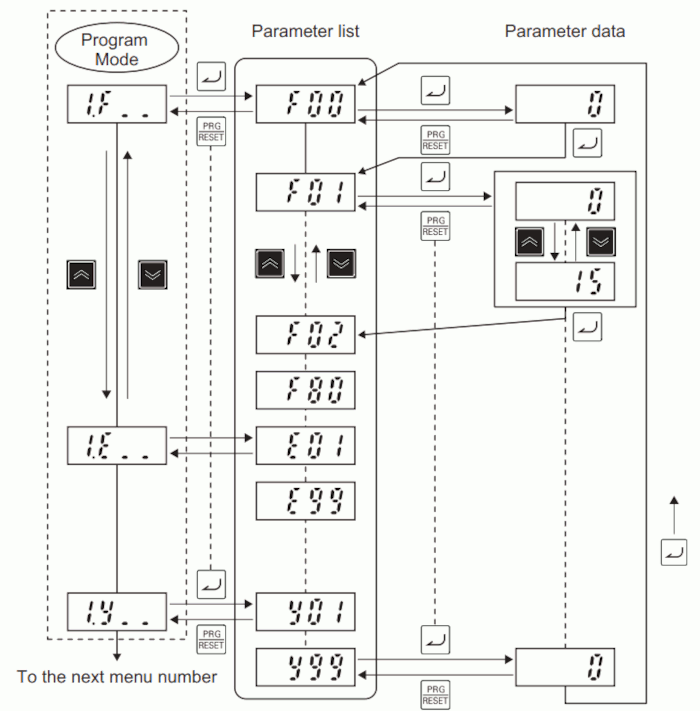
Data Setting: All parameters can be set at menu No. 1 ‘Data setting: to’ in the Program mode. To set parameters at menu No. 1 ‘Data setting,’ Operator Display Selection (E52) must be set to ‘0: Parameter data setting mode (menu 0 and menu 1)’ or ‘2: Full menu mode.’
The following figure shows transition through ‘Data setting.’
 origin: OMRON user
Documentation 3G3M1-STD User manual I669-E1-02.pdf
origin: OMRON user
Documentation 3G3M1-STD User manual I669-E1-02.pdf
Data Check: After parameters have been changed, they can be checked at menu No. 2 ‘Data check: 2.rEP’ in the Program mode. Only parameters that have been changed from their factory default values are displayed on the LED monitor. The data of displayed parameters can also be referenced and changed.
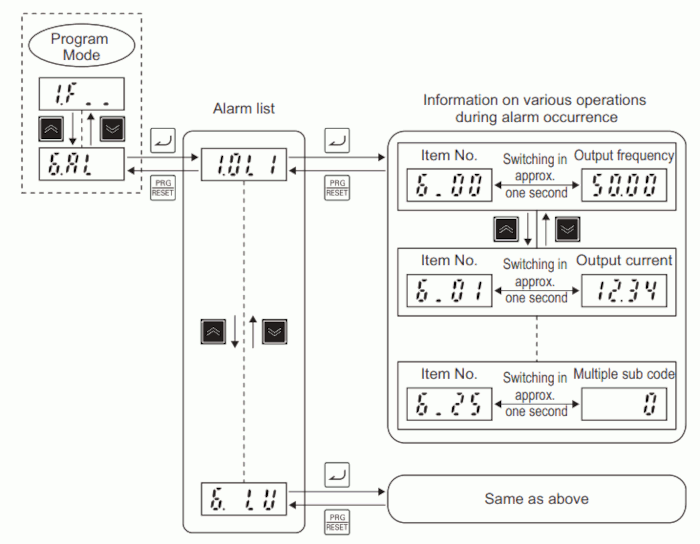
Alarm information: Menu No. 6 ‘Alarm information:’ indicates by alarm code which protection functions were activated in the past six instances. Alarm information indicating the status of the inverter when each alarm occurred also can be displayed. For details on ‘Alarm information’ please refer to the manual of the frequency inverter. The following figure shows transition through ‘Alarm information.’
 origin: OMRON user Documentation
3G3M1-STD User manual I669-E1-02.pdf
origin: OMRON user Documentation
3G3M1-STD User manual I669-E1-02.pdf