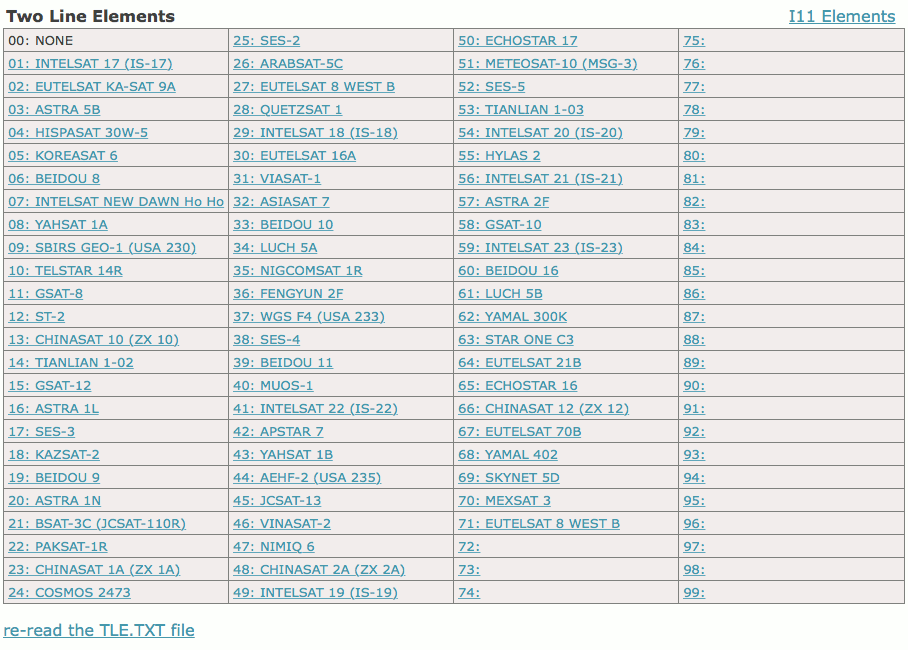
The ACU permits to store up 99 TLE ephemerides data sets and up to 99 Intelsat 11 parameter data sets. The datasets are numbered 1..99 and are referenced in the target memory data by this number. This means you assign a data set to a target satellite by its number rather than by its name.
Position 0 in the table is reserved and labeled ‘NONE’. In the Target Editor or when editing the actual tracking parameters, you may select dataset 0 to tell the ACU that there are no TLE/I11 ephemerides known for this particular satellite.
The Orbital Data Editor page shows a table of all 99 datasets of a type (TLE or I11) with their memory number and their name. Unused datasets have no name assigned, they are shown with their memory number only. The table shows either the TLE datasets of the I11 datasets, the heading above the table described which type of ephemerides are actually shown. At the top right corner of the page there is a link which you can click to switch between TLE and I11.
A click to the number or name of a dataset in the table opens a page which lets you edit the parameters of this particular dataset. For TLE parameter sets this is the TLE Dataset Editor , for I11 datasets the I11 Dataset Editor . At these pages the parameters of the datasets may be edited, the changed values may saved to the original or to another memory location.
At the bottom of the Orbital Data Editor page below the table there is link labeled “re-read the TLE.TXT fileâ€? (or “re-read the I11.TXT fileâ€? if the I11 datasets are actually shown). Clicking this link makes the ACU re-read the file like at power up.
At the end of each of the data set editor chapters you find a step by step instruction how to upload a complete set of 99 TLE or I11 datasets with FTP and how to make the ACU use the new data.
Orbital Data Editor Page Example: