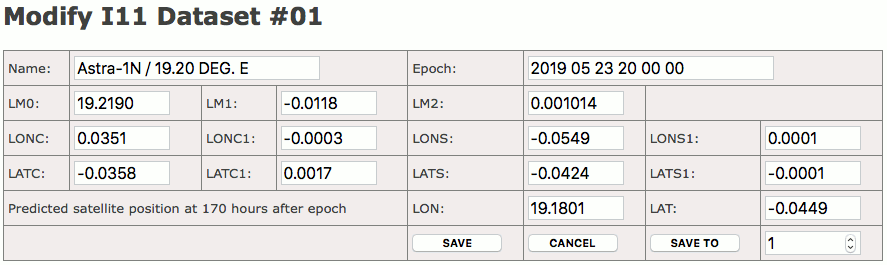
If you click to a I11 dataset number at the Orbital Data Editor page, the ACU opens the I11 Dataset Editor page for this particular dataset. The editor shows the I11 data as a form with multiple fields where each parameter can be edited. A number of buttons are provided to tell the ACU what to do with the edited dataset.
The buttons at the bottom of the I11 dataset editor page let you either save the edited values, save the edited values to another memory location or you may leave the editor without saving the changes.
All three buttons work immediately when clicked, there is no ‘do you really want’ query before the clicked action is executed. To delete a dataset, clear the ‘name’ input field and save the dataset, its content will be cleared.
170 Hour Prediction Values Check
The I11 ephemerides contain the predicted satellite at 170 hours after the epoch of the data set. The I11 dataset editor uses this predicted position to verify if the ephemerides data has been entered correctly. When the a data set has been saved (‘SAVE’ or ‘SAVE TO’), the ACU calculates the satellite position for 170 hours after the epoch and compares the calculated position to the predicted values in the data set. If they differ more than 0.005°, a warning is displayed with both, the calculated and the predicted angles.
The edited dataset is saved even with this warning displayed, but you should re-edit it and check if all values have been entered correctly.
I11 Dataset Editor Page Example:
For Intelsat ephemerides there is no compact standard format defined as is for TLE ephemerides, hence entering each particular parameter into the form shown above is the way to edit or update single I11 datasets at the ACU.
Beside this, the ACU permits to upload a text file with all 99 datasets with FTP. This way you may update / replace all I11 data at once. The procedure for this is described below step by step:
Step 1: repare a text file named I11.TXT containing all 99 I11datasets
In this file, each dataset occupies exactly 3 lines of text: one line with the satellite name followed by two lines of I11 data. The expected format for the I11 data is described below the example shown here:
EUTELSAT 10A
2020 04 29 00 00 00;10.0156;-0.0041;-0.000151;-0.0139;0.0005;-0.0598;-0.0003...
9.9328;-0.0580


EUTELSAT 12 WEST B
2020 04 29 00 00 00;-12.4836;-0.0024;-0.000200;0.0337;0.0005;-0.0746;-0.0001...
347.4772;0.5068
EUTELSAT 16A
2020 04 29 00 00 00;15.9867;0.0034;-0.000108;-0.0047;0.0004;-0.0584;-0.0004...
15.9675;-0.0562
EUTELSAT 33E
2020 04 29 00 00 00;33.0998;-0.0036;-0.000029;-0.0299;0.0003;-0.0370;-0.0004...
33.0263;-0.0425


EUTELSAT 7A
2020 04 29 00 00 00;59.6893;0.0029;0.000033;-0.0404;0.0000;-0.0292;-0.0004...
59.6600;-0.1654
The example above shows the the beginning of a I11.TXT file defining the ‘EUTELSAT 10A’ satellite in dataset 1, ‘EUTELSAT 12 WEST B’ in dataset 3, ‘EUTELSAT 16A’ in dataset 4 and so on. Datasets 2, 6 and 7 are empty in this example, unused datasets have to be expressed as three empty lines. Please note, that this scheme must be strictly followed as the software interprets the file content based on the line numbers.
The ACU uses a special text format for I11 parameters which contains the data for one satellite in three lines:
Line 1 contains the satellite name
Line 2 contains the epoch time and the 11 parameters of the satellite model. They have to be formatted as a semicolon separated line containing the coefficients in the following order:
EPOCH;LM0;LM1;LM2;LONC;LONC1;LONS;LONS1;LATC;LATC1;LATS;LATS1
The epoch has to be (exactly) defined in the format ‘YYYY MM DD HH MM SS’. Numbers have to be given with (exactly) 4 digits precision, except for the LM2 parameter which must be formatted with 6 digits following the decimal point.
Line 3 contains the prediction values as two numbers LON;LAT, each with 4 digits precision.
Step 2: upload the I11.TXT file to the ACU using FTP
You may use the FTP client of your preference for this, simply connect to the ACU’s IP address and log in with user name ‘service’, password ‘service’. Then upload the I11.TXT file to the default directory on the ACU. You may be asked to confirm if the existing I11.TXT file shall be overwritten.
Step 3: reload the I11.TXT file in the ACU software
For this last step open the Orbital Data Editor page from the navigation bar and ensure that the page shows the I11 ephemerides list (The heading ‘I11 Elements’ is shown at the top left).
Now click to the ‘re-read the I11.TXT file’ link at the bottom of the page.
The I11 data is now imported from the I11.TXT file, replacing all I11 ephemerides previously stored on the ACU.