2.3 Connecting the DEICE-Controller
The diagram below shows the layout of the DEICE-Controller's connectors:
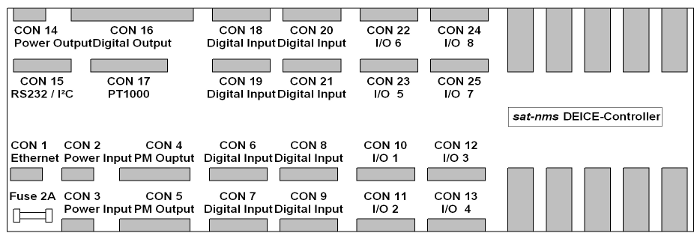
- CON1 is the Ethernet 100Base-T / RJ45 connector. Use a standard network cable to connect the DEICE-Controller to an Ethernet hub. If you want to connect your computer and the DEICE-Controller directly without using a hub, you need a crossover cable for this with swapped RX/TX lines.
- CON2 is to supply the sat-nms DEICE-Controller with power. You need two power packs, one for the +24VDC and another for the 24V_EXT circuit.
- CON3 is to realize a redundant power supply system. When you connect two other power packs on this connector the sat-nms DEICE-Controller switches automatically to the other supply in case of current loss.
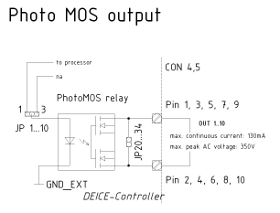
- CON4 and CON5 are the digital outputs via photomos-relays. The standard configuration is that the outputs are normal digital outputs. Therefore you the Position of JP1...12 are 1-2. How to change this is described in chapter 2.4 configuring the sat-nms DEICE-Controller
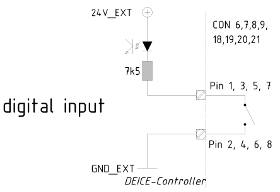
- CON6, CON7, CON8 and CON9 are the connectors for digital inputs 1...16. They are only able to detect potential-free contacts. Never put Voltage to this pins, the sat-nms DEICE-Controller might be damaged in this case.
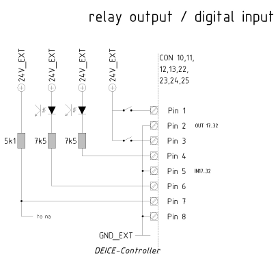
- CON10, CON11, CON12 and CON13 are the connectors for digital inputs 33...40 and relay output 17...24 as 24V power output. The Inputs are only able to detect potential-free contacts. Never put Voltage to this pins, the sat-nms DEICE-Controller might be damaged in this case. The outputs deliver 24V in ON State and are open in OFF state. The pin allocation is the same on all these connectors.
- CON14 is the spare power output. If you want to use the 24V_EXT for other units, you can take the power from here. The maximum continuous current that can be taken from here is 500mA. Never exceed this limit; the DEICE-Controller might be damaged.
- CON15 is the RS232 and the I2C-bus interface. If you need an adapter cable to connect the sat-nms DEICE-Controller via RS232 interface to your computer, call the support center of SatService GmbH. The I²C-bus interface can only be used with a customized software for the sat-nms DEICE-Controller and is for special requirements.
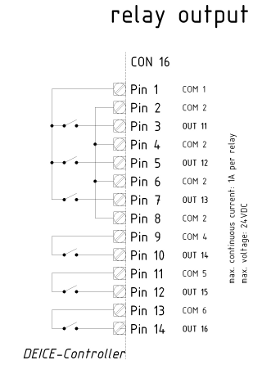
- CON16 is the connector for the digital outputs switched by relays. COM1 is switched by three relays to OUT1...3. OUT4, OUT5 and OUT6 are the switched signals of IN4, IN5 and IN6. The external voltage that has to be switched by the relays may not exceed 24V. The maximum continuous current that can be switched is 1A.
- CON17 the external sensors to measure up to 4 temperatures have to be connected here. You can use any standard PT1000 type.
- CON18, CON19, CON20 and CON21 are the connectors for digital inputs 17...32. They are only able to detect potential-free contacts. Never put Voltage to this pins, the sat-nms DEICE-Controller might be damaged in this case.
- CON22, CON23, CON24 and CON25 are the connectors for digital inputs 41...48 and relay output 25...32 as 24V power output. The Inputs are only able to detect potential-free contacts. Never put Voltage to this pins, the sat-nms DEICE-Controller might be damaged in this case. The outputs deliver 24V in ON State and are open in OFF state. The pin allocation is the same on all these connectors.
Power supply
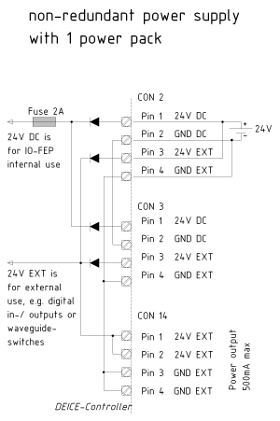
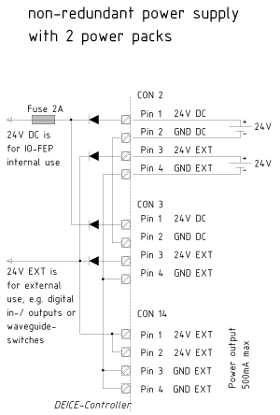
The sat-nms DEICE-Controller is prepared to use two different 24VDC power supplies: 24VDC is for the controller and processor circuit. 24V_EXT is used to supply the digital inputs and outputs. The DEICE-Controller is prepared for redundant power supply. So it is possible to supply the DEICE-Controller with one, two or four power supplies. We strongly recommend using minimum 2 power supplies to ensure the maximal system stability of the DEICE-Controller. The following pictures show you how to connect the power supplies to the DEICE-Controller.
- Using only one power supply in this case 24VDC and 24V_EXT have to be connected to one power supply as you can see in the following picture
- Using two power supplies here one power supply is connected to the 24VDC input and the other one to the 24V_EXT input.
- Using four power supplies if you like to have a redundant power supply for the DEICE-Controller you have to use 4 different power supplies. Connect them to the DEICE-Controller as you can see in the following picture. In case of failure of one power supply the DEICE-Controller is switching automatically to the other one and will be still running

The power supply for the +24VDC circuit has to have a minimum current load of 150mA. The supply for the 24V_EXT has to have a minimum current load of 500mA plus the current that will be taken from CON14 and the peak current of the biggest digital output to be controlled. Do not exceed the current-limit, in the circuit of 24V_EXT is no fuse implemented! The maximum peak-current for switching the digital outputs is 5A.
The fuse for +24VDC circuit is directly beneath the RJ45 connector CON1. In case of damage only put in their 2A types. Otherwise the sat-nms DEICE-Controller might be damaged.