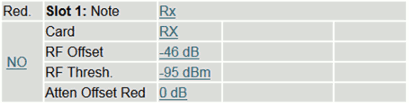
If "RX" is chosen as card type, you can change the following parameters:
| Parameter Name | Description |
|---|---|
| Red. | This parameter defines, if in case of failure the card will be replaced by the redundant card. If this parameter is set to 'NO' automatically switch-over is disabled for this card. This setting only works, if the parameter 'Redundancy' in the 'Setup' menu is set to 'auto'. The manual redundancy switching is possible whatever this parameter is set to. This field stays empty if no redundancy option is installed in your sat-nms LFTX/RX frame. |
| Note | You can give every slot a name with up to 18 characters. Click on the Hyperlink (in the picture beyond Rx2), a page to change this parameter will be opened. Type in here the desired slot name and press the submit button. |
| Card | To change the card-type, click on the field and a new page will be opened. Now choose the desired parameter (RX, TX, NONE) from the drop-down-menu and press the submit-button to pass the changed parameter to the chassis. |
| RF Offset | This parameter is a factory setting, that has not to be changed by the customer. Depending on the LFTX/RX chassis configuration the card has different internal RF attenuation. This value defines the offset to guarantee that the displayed value matches the real values at the I/O-connectors. |
| RF Thresh. | The RF threshold defines the RF fault level. If the RF level under-runs the threshold, the RF threshold alarm is set. To change the value click on it and enter the new RF threshold and press the submit button. Software-limits configuration: <-90dBm will disable the Threshold Alarm, <-95dBm will also disable the RF-card Alarm/Warning (Hardware Limit Card) at the Web-page and the remote interface. |
| Atten Offset Red | This value is only displayed when the redundancy switching option is installed in your sat-nms LFTX/RX frame. Use this offset to compensate gain differences between different optical links. This value will be added to the gain adjustment of the redundant link in case the redundant switching is initiated. This value is limited to -10...+10dB. For better understanding explained with help of an example: optical link installed in slot 1 (attenuator setting e.g. 10dB) is your standard link, slot 3 is the corresponding redundant link. When you switch slot 1 to the redundant link, the attenuator setting of slot 1 (10dB) is set to the redundant link to ensure the same signal level as before. Due to gain variation between different links (caused by tolerances in sensitivity of laser- and receive-diodes) it may happen that you see now a difference in the signal level (e.g. 2dB). The 'Atten Offset Red' value is used to balance this difference. So you have to configure this parameter to 2dB. When you now switch slot 1 to the redundant slot 3, the attenuator setting of slot 3 is set to 10dB+2dB=12dB result is the same signal level as well on the standard as on the redundant link. If the parameter 'Remote' is 'OFF' it is not possible to change this parameter by remote control. If Atten Offset Red is highlighted, it will show that in redundancy configuration the attenuator value plus the redundancy offset value is out of range (0..31dB). |