The fault display page lets you view the actual state of all fault flags and also the latches state of these flags.
From the main menu, select FAULTS and press  to see the faults display. The fault states are represented by a 2-character mnemonic.
| label | description |
|---|---|
| OK | Parameter ok |
| WN | Warning state |
| AL | Alarm state, parameter out of range |
The example below shows two examples of a faults display page.
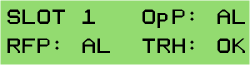
The first example shows the Fault Display of a LFRX card. The following parameters are shown:
| Parameter | Description |
|---|---|
| SLOT 1 | Number of the slot, which faults are shown actually |
| OpP | Optical input power state, here an alarm is displayed |
| RFP | State of the RF output power, here an alarm is displayed |
| THR | Shows, if the RF power is in range of the user-defined threshold, here an ok state is displayed. |
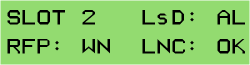
The second example shows the Fault Display of a LFTX card. The following parameters are shown:
| Parameter | Description |
|---|---|
| SLOT 2 | Number of the slot, which faults are shown actually |
| LsD | Shows, if the laser diode is working, here an alarm is displayed |
| RFP | State of the RF input power, here a warning is shown |
| LNC | Shows, if power consumption of the LNC is within the user-defined range. Here an ok state is displayed. |
If no card is placed to a slot, only *empty* is displayed in the fault menu.

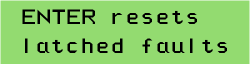
When you press the key during the LFTX/RX shows the fault state of a slot, you will be ask whether to reset the latched faults. To acknowledge this, press . To leave the fault display without resetting the latched faults, press  .
.