
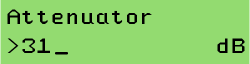
To change a numeric parameter like the RS232 interface baud rate, select this value from the SETTINGS menu. The upper display line describes the parameter, the lower line shows it's value:
To set a new value, press  . This changes to the editing mode, signalled by a '>' character in the first column. Use the
  or
or  keys to change the value.
To accept the changed value, press . Pressing  leaves the editing mode without changing the value.