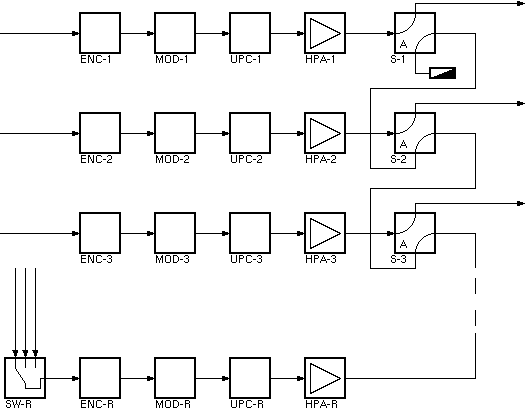
The Protection-Switch-N-To-1 logical device provides a completely software based solution for a N:1 redundancy switch. The device is preconfigured to handle 2 to 12 operative chains, but it may quite simply be extended to serve more chains. The block diagram below shows a typical application scenario for the Protection-Switch-N-To-1 device. Three operative transmit chains are backed up by one spare chain. A 'ladder' of waveguide switches at the chains' output controls which RF signal gets routed to the antenna.
During normal operation the waveguide switches are set as shown in the diagram. The output of the operative chains goes to the antenna, the output of the spare chain is routed to a dummy load. The protection switch watches (mirrors in memory) the key settings of all devices in the operative chains. In case of a fault in an operative chain, the spare chain gets gets switched in place of the faults chain and the spare devices are commanded to the settings which have been mirrored for the faulty chain.
The protection switch operates in 'single shot mode'. It switches once if a fault was detected, but never switches back automatically. After a switch-over to the spare chain, the operator has to check the equipment in the faulty chain. After everything is OK again, the signal can be switched back to the operative chain at a suitable time. Only now the transmission is backed up again.
The behaviour of the Protection-Switch-N-To-1 device is widely configurable, however to keep the number of configuration settings manageable, the device demands some rules in the overall structure and the device naming. These rules are:
Fault monitoring
The protection switch monitors the faults in each chain and controls the switch-over from these faults. A fault in an operative chain causes the protection switch to replace the faulty chain by the spare one. In contrast, a fault in the redundant chain prevents the protection switch from using the spare chain.
The device provides two modes of fault monitoring. If the 'faultMode' configuration parameter ist set to 'ALL FAULTS', the device monitor the summary fault states of all devices in a chain. If at least one faulty device is recognized and pending for 'switchDelay' seconds, a switch-over is triggered.
The device summary faults normally comprise all fault flags of a device including the communication alarm. There may be fault conditions which do not affect the RF performance of a chain and therefore should not trigger a switch-over. You may set such fault condition to the fault priority 'INFO' at each individual device to prevent them from being summarized in the device fault state.
The fault mode setting "HW FAULTS ONLY" ignores all device faults in the chains except for the fault stated by the 'hwFaultPrefix' devices. This mode is used to let the protection switch make up it's switch-over decision only from a fault reported by a relay circuit. Multiple relay circuits may be combined by hardware wiring or by sat-nms logical devices like the Gate-Array , Logical-Gate or the Logical-Gate-3 devices.
Klystron support
The protection switch supports the usage of a klystron amplifier in the spare chain. The klystron mode is enabled by defining a list of channel selector settings in the configuration / setup dialog.
In klystron mode, the protection switch commands a channel selector setting to the klystron amplifier during the switch-over process. RF power is kept OFF during the switchover until the klystron device states that it has successfully tuned to the commanded channel.
Switch-over and mirroring
If the device detects a fault in one of the chains and protection is enabled (globally for the device and individually for this chain), the device switches the redundant chain in place of the faulty one. The following happens:
If the protection switch device is configured to the switch mode "RF-ON" instead of "WAVEGUIDE", step 9 is done slightly different: No switch is actuated, but the redundant EIRP controller is commanded RF-ON while the controller in the defective chain is commanded RF-OFF.
Switch faults
The protection switch device also monitors the fault state of the output switches and the fault state of the input selection switch of the redundant chain as well. If the device detects a fault at one of the switches, it raises a "Switch hardware" fault. This situation blocks any redundancy switching.
Temperature fault monitoring
The protection switch is capable to monitor an additional fault signal for each chain which reports a temperature alarm caused by the RF power generated in this chain. Dummy loads or filter/power combiners are possible sources for such a temperature fault. If such a fault is detected, the protection switch commands the faulty chain RF-OFF and disables protection switching for this chain.
Device window pages
The following table shows which device window pages are available with this individual device type. Tool-bar functions not mentioned here are described at the general description of device windows .
 --- This page controls the operational parameters of the device.
 --- The faults page.
 --- The device info page.
 --- The maintenance page. The configuration parameters described below are set at this page.
Configuration parameters
At the maintenance page of the device window there are a couple of configuration parameters which must be set to interconnect the redundancy switch with the devices it shall monitor and control.
| parameter | description |
|---|---|
| switchMode | If set to 'WAVEGUIDE', the device will command a chain of waveguide switches in order to switch the spare chain in place of one of the operative chains. If set to 'RF-ON', the device will control the RF-ON settings of the EIRP control devices in each chain for this task. |
| faultMode | If set to 'ALL FAULTS', the summary faults of all devices in a chain will trigger a switch-over. Both, "WARNING" and "Summary FAULT" conditions will trigger a switch-over in this case. If set to 'HW FAULT ONLY' the device will monitor only the fault messages sent by the device identified by 'hwFaultPrefix' + chain-index. |
| firstIndex | The number appended to the name prefixes for the first operative chain (usually 1). If both, firstIndex and lastIndex are set to 0 the device does not apply any automatic indexing but interprets the ???Prefix settings as comma separated lists of device names. |
| lastIndex | The number appended to the name prefixes for the last operative chain (usually the number of chains to backup). If both, firstIndex and lastIndex are set to 0 the device does not apply any automatic indexing but interprets the ???Prefix settings as comma separated lists of device names. |
| hpaPrefix | The name prefix for the HPA device in each chain. The real device names are built by the device by appending the chain index to this string. If indexing is disabled, this is a comma separated list of device names. |
| upconverterPrefix | The name prefix for the upconverter device in each chain. The real device names are built by the device by appending the chain index to this string. If indexing is disabled, this is a comma separated list of device names. |
| modulatorPrefix | The name prefix for the modulator device in each chain. The real device names are built by the device by appending the chain index to this string. If indexing is disabled, this is a comma separated list of device names. |
| levelPrefix | The name prefix for the Level-Set / Level-Control device in each chain. The real device names are built by the device by appending the chain index to this string. If indexing is disabled, this is a comma separated list of device names. |
| auxPrefix | The name prefix for an auxiliary (e.g. MPEG Encoder) device in each chain. The real device names are built by the device by appending the chain index to this string. If indexing is disabled, this is a comma separated list of device names. |
| aux2Prefix | Like auxPrefix for another set of devices. |
| hwFaultPrefix | The name prefix for the a device in each chain which monitors the fault relay circuits of the equipment in the chain. Logical OR-ing of multiple devices may be done by hardware wiring or by logical devices provided by the sat-nms software. The real device names are built by the device by appending the chain index to this string. If indexing is disabled, this is a comma separated list of device names. |
| tempFaultPrefix | The name prefix for the a device in each chain which monitors a temperature alarm caused by the RF power generated in this chain. A fault recognized by this device will switch the chain to RF-OFF and disabled protection for this chain. A logical combination of multiple faults may be done by hardware wiring or by logical devices provided by the sat-nms software. The real device names are built by the device by appending the chain index to this string. If indexing is disabled, this is a comma separated list of device names. |
| sw1Device | The device name of the N:1 input switch in front of the spare chain. '.position' is automatically appended. You also may specify the complete message id of the switch position variable, e.g. 'MATRIX.output.4'. |
| sw1Positions | The switch position to be applied to the input switch. This is a comma separated list of switch settings. The first value designates the the switch setting in for first chain, the second one for the second chain and so on. There is no setting for the spare chain as the protection switch by default leaves this switch unchanged when switching back to 'NONE'. |
| sw1NonePosition | The switch position to be applied to the input switch when switching back to NONE. If empty, the the input switch remains at its least position, no position is commanded in this case. |
| sw2Prefix | The name prefix for the waveguide switches at the end of each chain. The real device names are built by the device by appending the chain index to this string. If indexing is disabled, this is a comma separated list of device names. |
| sw2NrmCmd | The waveguide switch setting that switches a chain to the antenna. |
| sw2BackupCmd | The waveguide switch setting that switches the spare chain in place of this chain. |
| klystronChSelect | The channel selector settings to be set at a klystron amplifier in the spare position. This is a comma separated list of settings like the 'sw1Positions' list. See the paragraph 'Klystron support' above for details. Leave this field empty if the spare HPA is not a klystron amplifier. |
| levelSetType | The type of level set devices the protection switch shall control. When set to LEVEL-CONTROL, the device expects Level-Control or Level-Set devices. When set to DELAY-LINE, the device expects Delay-Line devices instead. |
| preMirrorDelay | If this time (milliseconds) is set to a non-zero value, the switchover delays at least this time after switching the redundant chain input but before mirroring the chain parameters. The true delay time is rounded up to the next multiple of the device driver cycle (IDLE) time. |
| postMirrorDelay | If this time (milliseconds) is set to a non-zero value, the switchover delays at least this time after mirroring the chain parameters but before applying the EIRP setting. The true delay time is rounded up to the next multiple of the device driver cycle (IDLE) time. |
| redInputLevelId | If this field is not empty, the device treats it as the message identifier for the redundant chain input level. The value is checked against the threshold defined below during the switchover procedure. The procedure only proceeds to set the EIRP, if this level is above the threshold. If redInputLevelId is empty, no level check is done. |
| redInputLevelThresh | The threshold value for the level check described above. |
| abortOnSpareFault | If this is set ON, the device will check the spare chain fault just before the switches are actuated to switch the spare chain in place. If a spare chain fault has been raised during the mirroring procedure before, the switchover will be aborted and a fault is set. |
| standbyUpcOutput | If this parameter is not empty, it is interpreted as a UPC nominal output level which is set ar the redundant chain when the protection is switched back to NONE. Only applicable if UPC devices are configured. |
| userInterface | DROP-DOWN makes the device window to use a drop down control to select the chain to be backed up (the default user interface), BUTTONS selects a device screen using a sett of buttons to do the selection. Changes to this setting become visible when the device window gets opened the next time. |
Changes to most of the configuration parameter do not become effective until the VLC software is re-started. This is due to the fact, that the protection switch software has to allocate sat-nms parameters dynamically, depending on the number of chains configured. To signal this, the software sets the 'Config mismatch' fault flag as soon as such a configuration parameter is changed.
Fault descriptions
Parameter mirroring
The table below states which parameters are remembered and set at the devices of the spare chain in case of a switch-over.
| device | name config setting | mirrored parameters |
|---|---|---|
| HPA | hpaPrefix | No settings are mirrored. Changing the HPA settings would interfere with the level control device. In klystron amplifier mode, the channel selector setting is applied from a list defined in the protection switch device setup. |
| UPCONVERTER | upconverterPrefix | The transmit frequency setting is mirrored. |
| MODULATOR | modulatorPrefix | All configurable parameters which are not setup parameters are mirrored. Parameters marked with NOPRESET are excluded from mirroring as well. |
| EIRP control | levelPrefix | The EIRP value and calibration file name configuration setting are mirrored. |
| AUXILIARY (e.g. encoder) | auxPrefix, aux2Prefix | All configurable parameters which are not setup parameters are mirrored. Parameters marked with NOPRESET are excluded from mirroring as well. |
Standard and non-standard device indexing
The Protection-Switch-N-To-1 device provides an easy method to define the names of the devices referenced by the protection switch. The names are defined as prefixes, index are appended automatically to get the complete names. If e.g. firstIndex is 1 and lastIndex is 2, a prefix value "HPA-" would expand to the device names "HPA-R" for the spare device and "HPA-1", "HPA-2" for the operative devices at chains 1, 2.
There are situations where this naming scheme cannot be applied. This may happen if the device naming must match external conventions of if multiple protection switches are configured in one system, automatically indexed names would conflict. Specially the waveguide switch names often are critical for this. In such a situation the device names may be defined explicitly at the Protection-Switch-N-To-1 setup as described below:
Variables defined by this device driver
| name | type | flags | range |
|---|---|---|---|
| info.driver | TEXT | R/O | StringRange R/O |
| info.type | TEXT | R/O | StringRange R/O |
| info.frame | TEXT | R/O | StringRange R/O |
| info.chains | INTEGER | R/O | IntegerRange R/O (0 .. 0) |
| info.sequencing | TEXT | R/O | StringRange R/O |
| info.usesDelayLine | BOOLEAN | R/O | BooleanRange R/O (true false) |
| info.switching | TEXT | R/O | StringRange R/O |
| info.state | TEXT | R/O | StringRange R/O |
| config.switchMode | CHOICE | SAVE SETUP | EnumRange (WAVEGUIDE RF-ON) |
| config.faultMode | CHOICE | SAVE SETUP | EnumRange (ALL FAULTS HW FAULT ONLY) |
| config.firstIndex | INTEGER | SAVE SETUP | IntegerRange (0 .. 0) |
| config.lastIndex | INTEGER | SAVE SETUP | IntegerRange (0 .. 0) |
| config.hpaPrefix | TEXT | SAVE SETUP | StringRange |
| config.upconverterPrefix | TEXT | SAVE SETUP | StringRange |
| config.modulatorPrefix | TEXT | SAVE SETUP | StringRange |
| config.levelPrefix | TEXT | SAVE SETUP | StringRange |
| config.upcPrefix | TEXT | SAVE SETUP | StringRange |
| config.auxPrefix | TEXT | SAVE SETUP | StringRange |
| config.aux2Prefix | TEXT | SAVE SETUP | StringRange |
| config.hwFaultPrefix | TEXT | SAVE SETUP | StringRange |
| config.tempFaultPrefix | TEXT | SAVE SETUP | StringRange |
| config.abortOnSpareFault | CHOICE | SAVE SETUP | EnumRange (OFF ON) |
| config.sw1Device | TEXT | SAVE SETUP | StringRange |
| config.sw1Positions | TEXT | SAVE SETUP | StringRange |
| config.sw1NonePosition | TEXT | SAVE SETUP | StringRange |
| config.sw2Prefix | TEXT | SAVE SETUP | StringRange |
| config.sw2NrmCmd | TEXT | SAVE SETUP | StringRange |
| config.sw2BackupCmd | TEXT | SAVE SETUP | StringRange |
| config.klystronChSelect | TEXT | SAVE SETUP | StringRange |
| config.levelSetType | CHOICE | SAVE SETUP | EnumRange (LEVEL-CONTROL DELAY-LINE) |
| config.preMirrorDelay | INTEGER | SAVE SETUP | IntegerRange (0 .. 30000) |
| config.postMirrorDelay | INTEGER | SAVE SETUP | IntegerRange (0 .. 30000) |
| config.redInputLevelId | TEXT | SAVE SETUP | StringRange |
| config.redInputLevelThresh | FLOAT | SAVE SETUP | DoubleRange (0.0 .. 0.0) |
| config.standbyUpcOutput | TEXT | SAVE SETUP | StringRange |
| config.userInterface | CHOICE | SAVE SETUP | EnumRange (DROP-DOWN BUTTONS) |
| locationStored | TEXT | SAVE | StringRange |
| location | CHOICE | EnumRange (NONE) | |
| protection | CHOICE | SAVE | EnumRange (OFF ON) |
| switchDelay | FLOAT | SAVE | DoubleRange (0.0 .. 300.0) |
| chainFault | BOOLEAN | R/O | BooleanRange R/O (true false) |
| reset | TEXT | NOPRESET | StringRange |
| chain.0.name | TEXT | R/O | StringRange R/O |
| chain.1.name | TEXT | R/O | StringRange R/O |
| chain.2.name | TEXT | R/O | StringRange R/O |
| chain.3.name | TEXT | R/O | StringRange R/O |
| chain.4.name | TEXT | R/O | StringRange R/O |
| chain.5.name | TEXT | R/O | StringRange R/O |
| chain.6.name | TEXT | R/O | StringRange R/O |
| chain.7.name | TEXT | R/O | StringRange R/O |
| chain.8.name | TEXT | R/O | StringRange R/O |
| chain.9.name | TEXT | R/O | StringRange R/O |
| chain.10.name | TEXT | R/O | StringRange R/O |
| chain.11.name | TEXT | R/O | StringRange R/O |
| chain.12.name | TEXT | R/O | StringRange R/O |
| chain.1.enable | CHOICE | SAVE | EnumRange (OFF ON) |
| chain.2.enable | CHOICE | SAVE | EnumRange (OFF ON) |
| chain.3.enable | CHOICE | SAVE | EnumRange (OFF ON) |
| chain.4.enable | CHOICE | SAVE | EnumRange (OFF ON) |
| chain.5.enable | CHOICE | SAVE | EnumRange (OFF ON) |
| chain.6.enable | CHOICE | SAVE | EnumRange (OFF ON) |
| chain.7.enable | CHOICE | SAVE | EnumRange (OFF ON) |
| chain.8.enable | CHOICE | SAVE | EnumRange (OFF ON) |
| chain.9.enable | CHOICE | SAVE | EnumRange (OFF ON) |
| chain.10.enable | CHOICE | SAVE | EnumRange (OFF ON) |
| chain.11.enable | CHOICE | SAVE | EnumRange (OFF ON) |
| chain.12.enable | CHOICE | SAVE | EnumRange (OFF ON) |
| chain.1.protected | BOOLEAN | R/O | BooleanRange R/O (true false) |
| chain.2.protected | BOOLEAN | R/O | BooleanRange R/O (true false) |
| chain.3.protected | BOOLEAN | R/O | BooleanRange R/O (true false) |
| chain.4.protected | BOOLEAN | R/O | BooleanRange R/O (true false) |
| chain.5.protected | BOOLEAN | R/O | BooleanRange R/O (true false) |
| chain.6.protected | BOOLEAN | R/O | BooleanRange R/O (true false) |
| chain.7.protected | BOOLEAN | R/O | BooleanRange R/O (true false) |
| chain.8.protected | BOOLEAN | R/O | BooleanRange R/O (true false) |
| chain.9.protected | BOOLEAN | R/O | BooleanRange R/O (true false) |
| chain.10.protected | BOOLEAN | R/O | BooleanRange R/O (true false) |
| chain.11.protected | BOOLEAN | R/O | BooleanRange R/O (true false) |
| chain.12.protected | BOOLEAN | R/O | BooleanRange R/O (true false) |
| chain.1.replaced | BOOLEAN | R/O | BooleanRange R/O (true false) |
| chain.2.replaced | BOOLEAN | R/O | BooleanRange R/O (true false) |
| chain.3.replaced | BOOLEAN | R/O | BooleanRange R/O (true false) |
| chain.4.replaced | BOOLEAN | R/O | BooleanRange R/O (true false) |
| chain.5.replaced | BOOLEAN | R/O | BooleanRange R/O (true false) |
| chain.6.replaced | BOOLEAN | R/O | BooleanRange R/O (true false) |
| chain.7.replaced | BOOLEAN | R/O | BooleanRange R/O (true false) |
| chain.8.replaced | BOOLEAN | R/O | BooleanRange R/O (true false) |
| chain.9.replaced | BOOLEAN | R/O | BooleanRange R/O (true false) |
| chain.10.replaced | BOOLEAN | R/O | BooleanRange R/O (true false) |
| chain.11.replaced | BOOLEAN | R/O | BooleanRange R/O (true false) |
| chain.12.replaced | BOOLEAN | R/O | BooleanRange R/O (true false) |
| chain.0.chainFault | BOOLEAN | R/O | BooleanRange R/O (true false) |
| chain.1.chainFault | BOOLEAN | R/O | BooleanRange R/O (true false) |
| chain.2.chainFault | BOOLEAN | R/O | BooleanRange R/O (true false) |
| chain.3.chainFault | BOOLEAN | R/O | BooleanRange R/O (true false) |
| chain.4.chainFault | BOOLEAN | R/O | BooleanRange R/O (true false) |
| chain.5.chainFault | BOOLEAN | R/O | BooleanRange R/O (true false) |
| chain.6.chainFault | BOOLEAN | R/O | BooleanRange R/O (true false) |
| chain.7.chainFault | BOOLEAN | R/O | BooleanRange R/O (true false) |
| chain.8.chainFault | BOOLEAN | R/O | BooleanRange R/O (true false) |
| chain.9.chainFault | BOOLEAN | R/O | BooleanRange R/O (true false) |
| chain.10.chainFault | BOOLEAN | R/O | BooleanRange R/O (true false) |
| chain.11.chainFault | BOOLEAN | R/O | BooleanRange R/O (true false) |
| chain.12.chainFault | BOOLEAN | R/O | BooleanRange R/O (true false) |
| faults.01 | ALARM | R/O | AlarmFlagRange R/O (Spare chain) |
| faults.02 | ALARM | R/O | AlarmFlagRange R/O (Switch configuration) |
| faults.03 | ALARM | R/O | AlarmFlagRange R/O (Switch hardware) |
| faults.04 | ALARM | R/O | AlarmFlagRange R/O (Config mismatch) |
| faults.05 | ALARM | R/O | AlarmFlagRange R/O (Klystron channel) |
| faults.06 | ALARM | R/O | AlarmFlagRange R/O (Spare input level) |
| faults.07 | ALARM | R/O | AlarmFlagRange R/O (Protect enable) |
| faults.08 | ALARM | R/O | AlarmFlagRange R/O (Chain-1 protect enable) |
| faults.09 | ALARM | R/O | AlarmFlagRange R/O (Chain-2 protect enable) |
| faults.10 | ALARM | R/O | AlarmFlagRange R/O (Chain-3 protect enable) |
| faults.11 | ALARM | R/O | AlarmFlagRange R/O (Chain-4 protect enable) |
| faults.12 | ALARM | R/O | AlarmFlagRange R/O (Chain-5 protect enable) |
| faults.13 | ALARM | R/O | AlarmFlagRange R/O (Chain-6 protect enable) |
| faults.14 | ALARM | R/O | AlarmFlagRange R/O (Chain-7 protect enable) |
| faults.15 | ALARM | R/O | AlarmFlagRange R/O (Chain-8 protect enable) |
| faults.16 | ALARM | R/O | AlarmFlagRange R/O (Chain-9 protect enable) |
| faults.17 | ALARM | R/O | AlarmFlagRange R/O (Ch-10 protect enable) |
| faults.18 | ALARM | R/O | AlarmFlagRange R/O (Ch-11 protect enable) |
| faults.19 | ALARM | R/O | AlarmFlagRange R/O (Ch-12 protect enable) |
| faults.20 | ALARM | R/O | AlarmFlagRange R/O (Switched) |
| faults.21 | ALARM | R/O | AlarmFlagRange R/O (Switching aborted) |