5.1 The Web-based User
Interface
After having connected the ACU to a power supply and set the ACU's IP
address, you can access the ACU's user interface. To do this, start your
favorite web browser program (Internet Explorer, Netscape Navigator,
Opera or what else program you prefer). At the address field, where you
normally enter the URL of a web page you want to see, type in the IP
address of the sat-nms ACU you want to
control.
The ACU shows a web page consisting of a navigation bar at the left
side of the browser window and the actual antenna pointing in the main
part of the window. The readings automatically refresh once a second.
The refresh-rate may be adjusted on the setup-page from software version
2.1.007 or higher.
The navigation bar at the left contains a couple buttons which build
the ACU's main menu:
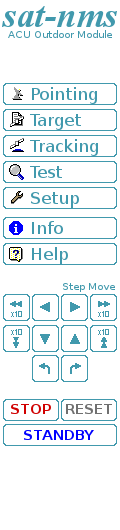 --- Pointing : This button switches back to the main page
you already see when you connect to the ACU. This page displays the
actual antenna pointing together with some status information. You also
use this page to move the antenna to a certain pointing given as azimuth
/ elevation values.Target : By clicking to this
button you switch to the 'Target' page where you can store and recall
the antenna pointing for up to eight satellites.Tracking : sat-nms ACUs with
the tracking option installed offer the tracking mode and tracking fine
tune parameters on this page.Test : By clicking to
this button you switch to the 'Test' page. The 'Test' page shows the low
level I/O signals of the ACU. It helps you to install the ACU or to
identify a malfunction of peripheral components.Setup : This button switches to the 'Setup' page which
lets you inspect or change less common parameters which usually are set
only once to adapt the ACU to it's working environment.Info : After a mouse click to this button, the ACU
outdoor module shows a table with information like the serial number of
the device or the revision ID and compilation date of the software.Help : Clicking to this button shows the on-line
version of this user manualStep Move: Clicking to the buttons in this
area moves the antenna a small step to the indicated direction. For
azimuth and elevation 'small step' and 'large step' buttons are
provided. A 'small step' is the angle defined with the 'XX step delta'
parameters at the Setup page, a 'large step' is ten
times this value. With the polarization axis, steps always are 1°.STOP:
Clicking to the STOP button immediately stops all motors. The ACU
indicates a fault. A click to the RESET button releases this
fault.RESET: The RESET button lets the ACU acknowledge any motor diver
faults by activating the reset-circuit to the motor drivers for 800
msec. All faults internally latched by the ACU are cleared and the
target pointing values are set to the values actually read from the
position sensors.STANDBY: The STANDBY button puts the pointing loop of
all axes to 'standby' mode: Differences between measured and commanded
value do not cause the motors to be driven in this mode. Standby mode
can be used for maintenance purposes or to move the antenne by actuating
the frequency inverters directly by hardware circuits. To leave standby
mode, click the STANDBY button again or RESET.
--- Pointing : This button switches back to the main page
you already see when you connect to the ACU. This page displays the
actual antenna pointing together with some status information. You also
use this page to move the antenna to a certain pointing given as azimuth
/ elevation values.Target : By clicking to this
button you switch to the 'Target' page where you can store and recall
the antenna pointing for up to eight satellites.Tracking : sat-nms ACUs with
the tracking option installed offer the tracking mode and tracking fine
tune parameters on this page.Test : By clicking to
this button you switch to the 'Test' page. The 'Test' page shows the low
level I/O signals of the ACU. It helps you to install the ACU or to
identify a malfunction of peripheral components.Setup : This button switches to the 'Setup' page which
lets you inspect or change less common parameters which usually are set
only once to adapt the ACU to it's working environment.Info : After a mouse click to this button, the ACU
outdoor module shows a table with information like the serial number of
the device or the revision ID and compilation date of the software.Help : Clicking to this button shows the on-line
version of this user manualStep Move: Clicking to the buttons in this
area moves the antenna a small step to the indicated direction. For
azimuth and elevation 'small step' and 'large step' buttons are
provided. A 'small step' is the angle defined with the 'XX step delta'
parameters at the Setup page, a 'large step' is ten
times this value. With the polarization axis, steps always are 1°.STOP:
Clicking to the STOP button immediately stops all motors. The ACU
indicates a fault. A click to the RESET button releases this
fault.RESET: The RESET button lets the ACU acknowledge any motor diver
faults by activating the reset-circuit to the motor drivers for 800
msec. All faults internally latched by the ACU are cleared and the
target pointing values are set to the values actually read from the
position sensors.STANDBY: The STANDBY button puts the pointing loop of
all axes to 'standby' mode: Differences between measured and commanded
value do not cause the motors to be driven in this mode. Standby mode
can be used for maintenance purposes or to move the antenne by actuating
the frequency inverters directly by hardware circuits. To leave standby
mode, click the STANDBY button again or RESET.